
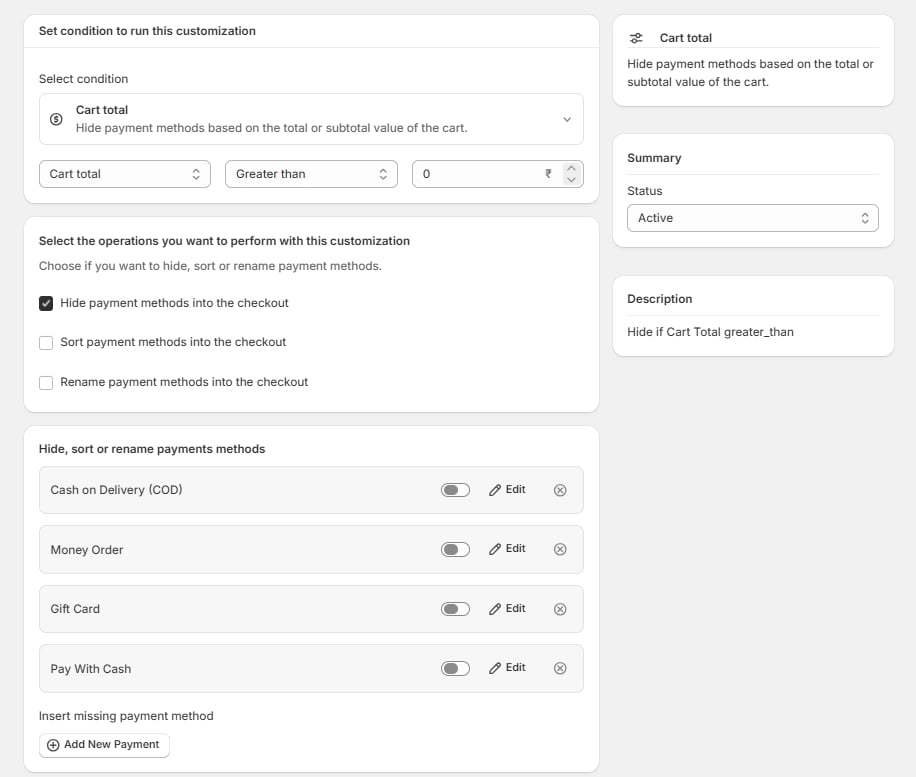
Building one
1. Set the condition
Select condition opens the condition picker, grouped by section — Cart, Customer, Product, Order, Discount, Shipping, Attribute. Pick one. The full list is in the Conditions reference. Below the picker, three fields appear:- The field — some conditions offer a choice here. Cart total, for example, lets you compare against the total or the subtotal, which differ once discounts and shipping are applied.
- The operator — Greater than, Less than, is, is not, contains, is between, is empty, and so on. Which operators appear depends on the condition.
- The value — a number, a currency amount, a country, a tag. The field type follows the condition.
2. Choose the operations
Three checkboxes, and you may tick more than one:- Hide payment methods into the checkout
- Sort payment methods into the checkout
- Rename payment methods into the checkout
3. Select the payment methods
The list below shows every method enabled on your store — Cash on Delivery, Credit Card (Shopify Payments Provider), Credit Card (Stripe), Amazon Pay, Money Order, Bank Deposit, PayPal Express Checkout, PayPal, and whatever else you have configured. Toggle on the methods this rule acts on. Edit next to a method opens its per-method settings — the new label if you are renaming, the priority if you are sorting.4. Set status and save
Right column, Status: Active to go live on save, Draft to keep working. Then Save in the top bar.A worked example
Hide Cash on Delivery on orders above ₹10,000.- Condition → Cart total, field Cart total, operator Greater than, value 10000
- Operation → Hide payment methods into the checkout
- Toggle on Cash on Delivery (COD)
- Status Active → Save